
Sticky Notes and OneNote: A new artifact for Velociraptor
Sticky Notes is one of those small Windows applications that sometimes turns out to be surprisingly valuable during forensic work. Over time, I’ve noticed that people tend to store all sorts of sensitive or useful information in there. Everything from passwords and quick reminders to various other notes. Because of that, it’s always one of the artifacts I make sure to check during an investigation.
Recently, this came up again when I needed to collect Sticky Notes from a machine as part of an investigation.
As usual, I started by going straight to the standard file locations I'd relied on in the past. These paths are well documented on Forensafe and are also referenced in the KapeFiles targets repository. Normally, this approach works without any issues.
This time, however, I immediately ran into a problem: there was simply no data in any of the expected locations. No StickyNotes.snt, no plum.sqlite. The directories were completely empty, which was a bit unexpected.
After digging a little deeper, I discovered that Microsoft has rolled out a newer version of Sticky Notes that is integrated with OneNote. With this updated version, the traditional storage paths no longer apply, which explains why the usual artifacts were missing.
So, with that in mind, this post explains where the new version stores its data and introduces a Velociraptor artifact I wrote to collect it.
Where Sticky Notes used to live
For context, the legacy old locations are as follows:
- Microsoft Sticky Notes (Windows 7, 8, and 10 version 1511 and earlier)
Path:C:\Users\%user%\AppData\Roaming\Microsoft\StickyNotes\
File:StickyNotes.snt - Microsoft Sticky Notes (Windows 10 version 1607 and later, before the OneNote integration)
Path:C:\Users\%user%\AppData\Local\Packages\Microsoft.MicrosoftStickyNotes*\LocalState\
File:plum.sqlite*
If you are still seeing those paths and files, the system is running the old Sticky Notes application. If the folders are empty, the user is likely running the newer OneNote-based version.
What changed?
Microsoft introduced a new Sticky Notes app that runs on top of OneNote. From the Microsoft 365 Insider blog:
"The new Sticky Notes app is available to Current Channel (Preview) users running OneNote on Windows Version 2402 (Build 17328.20000) or later."
In practice, this means the notes are no longer stored in the old Roaming or Packages directories. Instead, they are written by the OneNote process to a different location. If your system is running a recent Current Channel (Preview) build with OneNote installed, you should expect the notes to reside in the location described below.
Finding the new location
I spun up a Windows 11 lab VM with the latest version of OneNote installed, to do some testing. I ran Procmon, and filtered on write operations from the onenote.exe process. My reasoning was that the notes have to land on disk somewhere, so that filter should reveal the new storage path.

The new base path is:
%UserProfile%\AppData\Local\Microsoft\OneNote\16.0\Memory
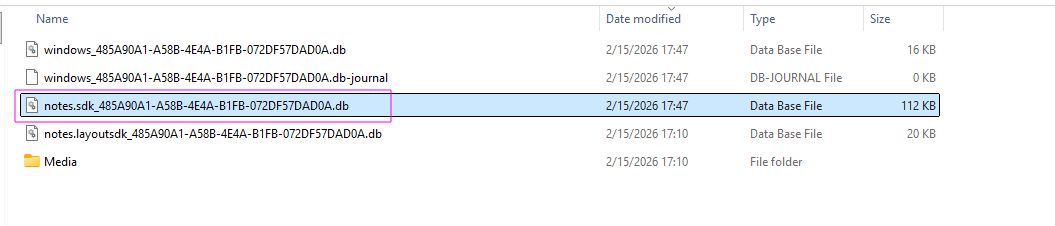
Inside that folder you will find a SQLite3 database named notes.sdk_*.db. I opened it up in SQLite3 and checked the schema. The raw note content itself resides in a table called notes, in the value column. That column contains a nested and escaped JSON object, which includes the creation time, last modified time, and the text itself, among other things. Each row therefore represents a single note.
The Velociraptor artifact
I use Velociraptor for most of my DFIR work, both with their live agents aswell as for deadbox forensics. I therefore wrote an artifact for this new Sticky Notes update. The artifact discovers these these databases per user profile, reads the notes table, parses the nested escaped JSON from the value column, and outputs one row per note with both the creation and last-modified timestamps, and the full note content. This is way easier than having to pull the SQLite3 database yourself and parse the ugly nested json data with a manual SQL query.
Here is an example output:
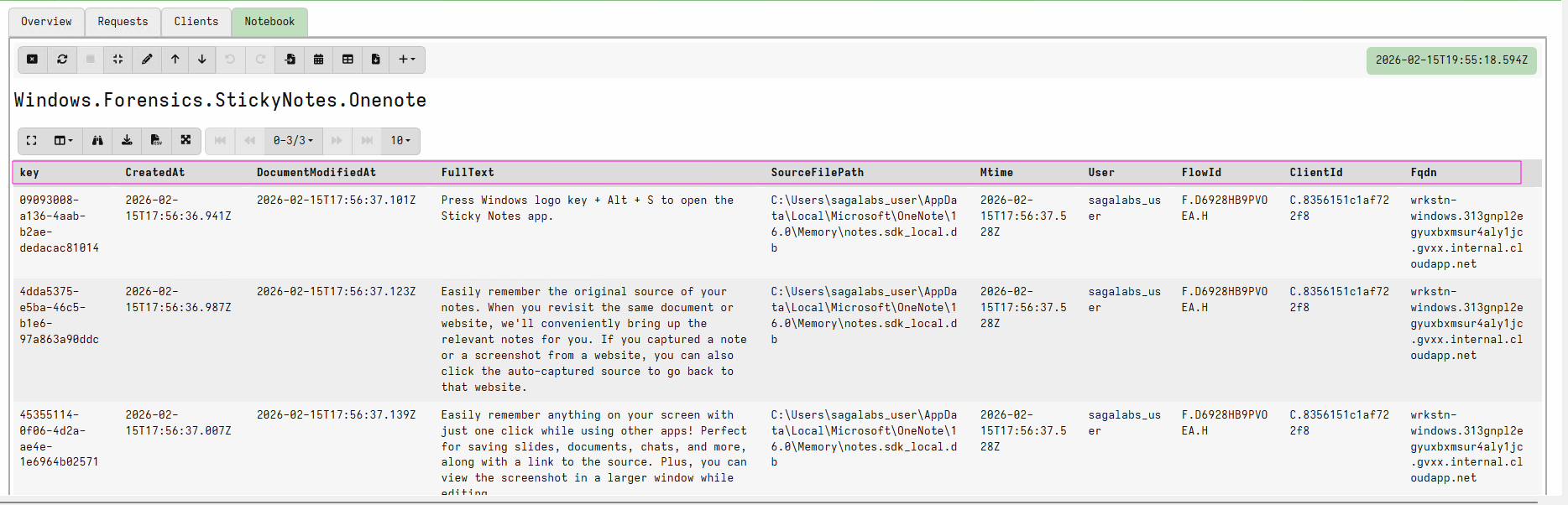
As you can see, the output includes the note ID, creation and last-modified times, and the full note content in a structured format. This makes it easy to filter in the notebook or export results for later analysis.
Final thoughts
If you are only collecting the old paths, you may miss data on systems running the newer OneNote-backed version of the application. The artifact below targets the new location only, so for full coverage you should continue collecting the old paths as well.
If you have any questions or feedback, feel free to reach out.
Velociraptor artifact
1name: Windows.Forensics.StickyNotes.Onenote
2author: "Victor Buch | victorbuch.dk"
3
4description: |
5    Reads the new OneNote-based Sticky Notes app SQLite databases and outputs each notes content along with its creation and last-modified timestamps
6
7reference:
8  - Sticky Notes and OneNote A new artifact for Velociraptor (https://victorbuch.dk/articles/sticky-notes-artifact)
9  - Microsoft 365 Insider blog Introducing the new Sticky Notes app on Windows (https://techcommunity.microsoft.com/blog/microsoft365insiderblog/introducing-the-new-sticky-notes-app-on-windows/4223819)
10
11
12parameters:
13  - name: StickyNotesGlob
14    default: "\AppData\Local\Microsoft\OneNote\16.0\Memory\notes.sdk*.db"
15  - name: userRegex
16    default: .
17    type: regex
18
19type: CLIENT
20
21sources:
22  - precondition:
23      SELECT OS FROM info() WHERE OS = 'windows'
24
25    query: |
26      LET sticky_notes_db = SELECT *
27        FROM foreach(row={
28          SELECT Uid,
29                 Name AS User,
30                 expand(path=Directory) AS HomeDirectory
31          FROM Artifact.Windows.Sys.Users()
32          WHERE Name =~ userRegex
33        },
34                     query={
35          SELECT User,
36                 OSPath,
37                 Mtime
38          FROM glob(globs=StickyNotesGlob, root=HomeDirectory)
39        })
40
41      LET notes_rows = SELECT *
42        FROM foreach(row=sticky_notes_db,
43                     query={
44          SELECT key,
45                 regex_replace(source=value, re='""', replace='"') AS clean_value,
46                 OSPath,
47                 Mtime,
48                 User
49          FROM sqlite(file=OSPath, query="SELECT key, value FROM notes")
50        })
51
52      LET notes_with_time = SELECT
53          key,
54          clean_value,
55          OSPath,
56          timestamp(epoch=parse_json(data=clean_value).createdAt) AS CreatedAt,
57          timestamp(epoch=parse_json(data=clean_value).documentModifiedAt) AS DocumentModifiedAt,
58          OSPath AS SourceFilePath,
59          Mtime,
60          User
61        FROM notes_rows
62
63      LET paragraphs = SELECT key,
64                              CreatedAt,
65                              DocumentModifiedAt,
66                              _value.content.text AS ParagraphText,
67                              OSPath AS SourceFilePath,
68                              Mtime,
69                              User
70        FROM foreach(row=notes_with_time,
71                     query={
72          SELECT key,
73                 CreatedAt,
74                 DocumentModifiedAt,
75                 OSPath,
76                 Mtime,
77                 User,
78                 _value
79          FROM items(item=parse_json(data=clean_value).document.content)
80        })
81
82      SELECT key,
83             CreatedAt,
84             DocumentModifiedAt,
85             join(array=ParagraphText, sep=" ") AS FullText,
86             SourceFilePath,
87             Mtime,
88             User
89      FROM paragraphs
90      GROUP BY key, CreatedAt, DocumentModifiedAt, SourceFilePath,
91                 Mtime, User
92